Reading and Consumption

All the information you need to clarify your doubts about invoices, technical faults or the use of MEO Energia services.

my MEO App

The new customer app that has what you need, inside and outside the home.

Learn more
Screenshots of the my MEO app

More help?

Talk to us or go to a MEO store

MEO Stores

Visit us in our stores from the north to the south of the country.

MEO Stores

Helpline

800 028 028

Available on weekdays from 9 a.m. to 9 p.m.
Free call, exclusive to MEO Energia.

Electrical faults

800 506 506

E-Networks Distribution.
Available 7 days a week, 24 hours a day.
Free call.

Contact form

For questions related to electricity and mobility, fill in the form.

Learn more

Useful Information

Electricity

tariffs

Fixed Tariff
Dynamic Tariff

Standardised Information Sheet

Fixed Tariff
Dynamic Tariff

General Conditions

Fixed Tariff
Dynamic Tariff

Electric mobility

tariffs

Fixed Tariff
Dynamic Tariff

General conditions

Fixed Tariff
Dynamic Tariff

Reading and Consumption

  • What is a smart meter?

    Smart meters are intelligent electricity management devices that are integrated into smart grids, providing more efficient management of the electricity network and have a number of advantages.

    Advantages of smart meters
    • Automatic registration, no need to take readings every month
    • Billing based on actual consumption 
    • Contractual changes can be made remotely, without the need for a technician from the network operator to visit the site
    • Access your energy consumption data and thus ensure more efficient management of your consumption, reducing your electricity bill.

    Find out how to install your smart meter.

  • Where can I find the previous readings?

    You can check the latest reading at the app my MEO, in the the customer my MEO, in the customer Business Large Enterprises), or in the reading history at the bottom of the bill:

    In the my MEO app:
    1. Choose the Services option
    2. Select MEO Energia
    3. Then choose View all


    If you are inthe customer my MEO area, you will need to select MEO Energia from among your services.


    • Select the CPE you want to see the readings for and press the READINGS button.


    • Under "Send reading" press "VIEW LAST READING".

    In the customer Business Area, go to the menu: Accounts and Products > Products and Services.


    On the 3rd page of the invoice you can see the history of readings:


  • Installation of smart meters and associated services

    You can check if you already have a smart meter by calling 800 028 028 (available on weekdays from 9am to 9pm, free calls). 

    The installation of the smart meter is not carried out by MEO Energia, but by your Distribution Network Operator and you will therefore have to wait for notification of the installation of the smart meter from your Network Operator.
    Smart meters are installed according to geographical criteria agreed by the Distribution Network Operator with ERSE (Entidade Reguladora dos Serviços Energéticos) and it cannot oppose their installation.
     After installation, tests are carried out to ensure the correct communication of consumption, and you are advised to continue sending readings during this testing period. You will be informed by the Network Operator when your meter is integrated into the smart grid, so you no longer need to send readings and billing is based on actual consumption.

    The cost of the installation is borne by the Distribution Network Operator and, as such, there is no additional cost to you. 

    The Distribution Network Operators offer you additional services associated with smart meters that allow you to access your energy consumption and production data, such as:
    • Access to the serial communication port, which allows you to monitor your consumption in real time and make adjustments to reduce your electricity bill. You'll need to ask E-Redes for the HAN port on your electricity meter, as you'll need to schedule an appointment with E-Redes technicians where they'll have to seal/seal it to place a wire, known as the HAN port. You will then need to buy an electronic meter that will transmit your consumption in real time to your mobile phone . Note that the connection must be covered by a wireless network.
    • Access to the load diagram, which can be one-off or daily. The one-off access service can be requested if you have a smart meter, allowing you to access the load diagram with your electricity consumption in 15-minute periods over the 30 days prior to the date of the request Access to the daily load diagram is available if you have your meter integrated into a smart grid and allows you to permanently consult the load diagram with your electricity consumption in 15-minute periods over the previous 24 months In cases where there is production, you can also consult the quantities of energy injected into the grid. 
    • Carrying out remote operations, such as changing the contracted power, tariff and activating or deactivating your energy supply.

  • How to send readings and on what date?

    Sending your electricity reading ensures that your bill is in line with your consumption, avoiding estimated billing. So you only pay for what you consume.
    There are 3 types of readings:
    • Estimated –A reading based on an estimate of consumption using daily average criteria
    • Real - Reading made by the distributor on the meter itself based on real consumption data
    • customer - Reading sent by the customer.

    Readings can be reported at:
    • App my MEO. Convenient, simple, and fast
    • Area of customer my MEO or Business customer  (Large Companies)
    • Toll-Free Helpline:800 028 028(Every day)  

    The date for reporting the reading can be found at:
    • my MEO App (Android |iOS)
    • Department of customer my MEO orBusiness customer
    • Invoice
    • Monthly text alert

    _____________________________________________________________________________________

    How to submit meter readings to App my MEO
    1. Choose the Services option
    2. Select MEO Energia
    3. Then choose Next Reading
    4. Depending on your tariff you will have 3 ways of filling in the readings:
      • Simple tariff: 1 "Simple" field
      • Two-hour tariff: 2 fields to fill in "Single" and "Off-peak" 
      • Three-hour tariff: 3 fields to fill in "Empty", "Peak" and "Full"
    5. Finally, click the "Submit Reading" button
    Services Home PageReadingsSimple timetableBi-hourlyTri-HourlySend ReadingReading Sent


    • customer  Departmentmy MEO or customer Business (Large Companies), by following these steps:
    1. Go to the electricity meter on your floor or house
    2. Go directly to the Energy area of my MEO and select Readings
    3. Record the values for full, tip and empty in the appropriate space 
    To view the serviceat customer my MEO, you will need to select MEO Energia from among your services.

     
    Note: Find out how to have the MEO service registered in the customer area.


    To submit readings to the customer Business Portal, go to the menu:Accounts and Products > Products and Services.

    _______________________________________________________________________________

    If your meter does not read automatically, you will receive a monthly text message with the date on which you need to report the readings.
    You can check the meter reading date in the " my MEO " app.
    Readings  
    You can also check on the first page of your invoice:
    Next reading 
    If you have ameter with remote reading, or if the meter has been recently replaced, you may not need to submit monthly readings.
    Check themy MEO apptosee whattype of meter youhave.
    Automatic reading  
  • How do I know my meter type?

    You can check the meter type inthe app at my MEO, inthe " customer " section atmy MEO, and on your bill (both remote and non-remote), as well as the meter number at TV show .

    In the my MEO app:

    • Without smart meter

    • With smart meter


  • How to remove the meter reading?

    How you take your meter reading depends on the type of meter you have installed:

    Electromechanical- Counters with electromechanical display and can have more than one register

    Electromechanical counter with 1 register

    • 1 meter (Single-Rate Billing - Electricity consumption is billed in a single period)

    • 2 registers(Bi-hourly - The electrical energy consumed is being recorded in 2 periods of Full and Empty)

    • 3 registers(Tri-hourly - Full, Empty, and Peak period consumption).
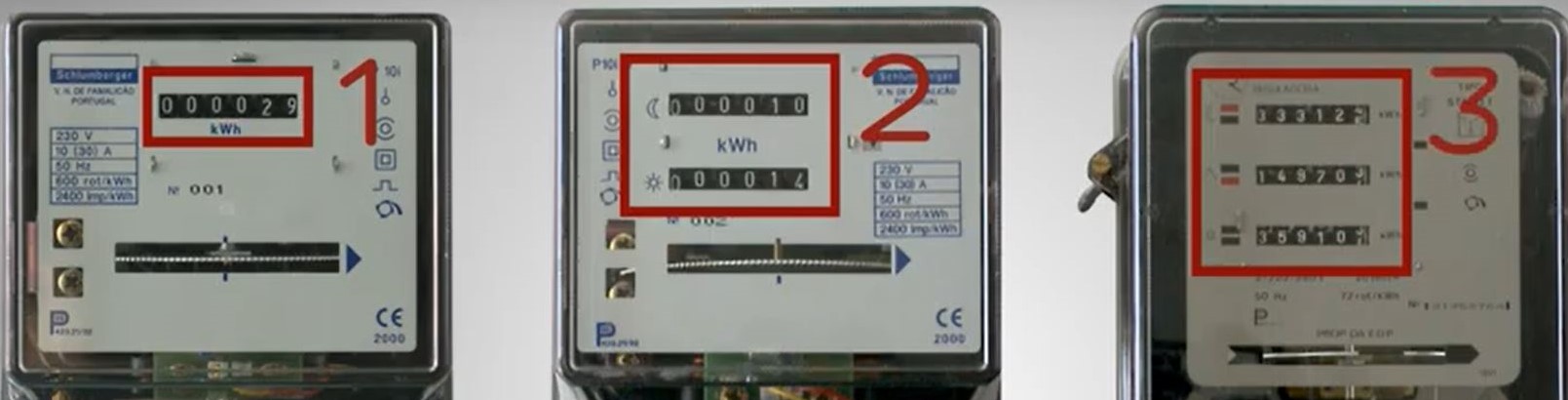

    Electromechanical counter with 3 registers


    Please note: Enter all digits,excludingthose to the right of the decimal point or those in red.


    Static- They arefully electronic, have a digital display, and the readings appear automatically and sequentially.
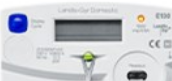
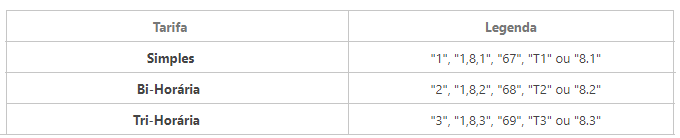
    Static Counter


    Regardless of the type of schedule you have, you must take readings for the following periods:Off-peak, Peak, and Full.


    Hybrid– These havean electromechanical display and a digital display. To take a reading, consult the digital display.
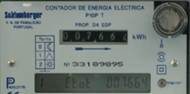
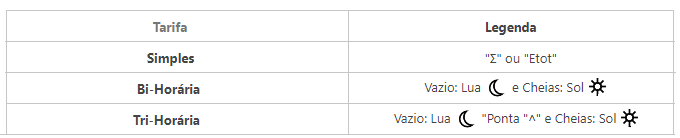
    Hybrid Counter

    Hybrid meter tariff


    Smart-They are fully electronic, have a digital display, and the values appear automatically and sequentially, recording electricity consumption at all times. 
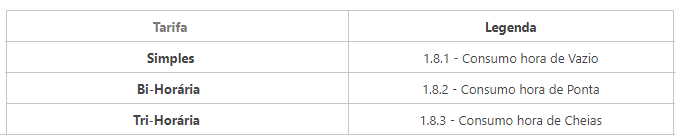
    smart meter tariff

    It can communicate automatically, without the need for manual intervention. 

    When this feature is active, you will receive a communication from E-REDES with this information. Until then, we advise you to continue sending your meter readings periodically.


  • With remote meter reading, is it necessary to submit meter readings?

    Only a fewmeters with remote reading capabilitiesautomaticallytransmitmeter readings and allow for remote operations, such as changing the contracted power capacity or adjusting the electricity rate schedule.


    Check the " my MEO " app and your bill to see if you need tosubmit meter readings.
    -" my MEO " app:
    • Without smart meter


    • With smart meter


    - On the invoice:
    • Without smart meter
    Image of next reading on MEO Energia invoice without smart meter

    • With smart meter
    Image of the next reading on the MEO Energia bill with smart meter


    - In the customer area my MEO:
    Image of the next MEO Energia reading in themy MEO  customer my MEO area with automatic reading

  • The reading I sent was rejected or an estimate appeared

    The reading may not be accepted if:
    • is very different from the average consumption value
    • is lower than the last reading recorded.

    For more information or clarification, contact the Helpline, 800 028 028 (free call), on working days from 9am to 9pm.


    If you have provided a reading, but your consumption is being billed by estimate, this can happen for 3 reasons:
    1. Reading reported out of date
    2. Changing the meter to remote reading - The remote reading meter can be in a testing phase for up to 6 months before it starts taking automatic readings. If it has exceeded this period it may be a fault, and the readings are taken by estimate
    3. First bill - If this is your first MEO Energia bill, you may get an estimated reading, based on the last reading from your old supplier.